Why Your Voice Over Invoicing Should be Set Up the Day You Launch
I learn so much and am often so inspired by my voice over students. Recently, a very talented student new to voice over who had all his demos done and his website up and running booked his first gig! YAY! He reached out and wanted to know how to send an invoice. I was surprised by this. I was less surprised that he did not know and more surprised that I did not make it clear. So here I am, making it clear: if you are at the point where you are auditioning for work and ready to accept booked work that the universe sends your way, you had better have your business bank account up and running, and your voice over invoicing software set up and ready for use. Even though we had talked about invoicing and talked about CRMS, apparently I did not make it straightforward enough, so this is me making it clear. Do not start looking for work if you do not know what you are going to do when that work comes in. Why? From start to finish, you want you your client to have a seamless, professional experience, and if they have not taken every single step that you have discussed, then they are not ready to launch yet. Period.
My Personal Voice Over Invoicing Preference: Wave App
Over my years as a working voice talent, I have tried many different types of billing programs. I strongly prefer Wave App for several reasons. First of all, it’s free. Next, it is integrated rather seamlessly into the CRM I use, Voiceoverview. Because of this integration, I can create the invoice, modify, edit, and send it all within VOV. I can create shareable links and download PDFs of the invoice. I was able to customize the design to include my logo and the fonts that I prefer. All in all, of every option I have tried for invoicing over the years, this has been my absolute favorite.
Fresh Books
I very much liked using Fresh Books and its features and the only real downside is the heft monthly cost. I liked the look of the invoices it created. I liked that I could accept bank transfers, credit cards, and PayPal! I liked that I could add taxes for different countries. I very much liked the time tracking features. When I have done copywriting work, I used this feature and could do precise, to the second invoicing with ease. I also liked that for clients in other countries this program could sort out VATs and all of that and my effort was very little. Again, if it were free I would likely still use it.
PayPal
I love that you can create invoices for free. I do have some clients who specifically ask for PayPal invoices and I am happy to send them. Because they do not integrate with my CRM, I prefer Wave App to this, simply for ease of record keeping. This is fine, but not as great.
Square
I tried Square for several months several years ago. Other than to say it was lackluster compared to other invoicing systems, I do not have much to see. The look of the invoices was “ehh.” It was not as easy to work with. My overall experience was mediocre. Not bad, just not exciting.
Quicken
I have never endeavored to use Quicken, but much like Fresh Books those who do use it seem to love it very much. Quicken provides many features, and can both invoice and work as your accounting software. Again, like Fresh Books, you have to pay to use Quicken.
Voice Over Invoicing Best Practices
As small business owners with a client-centered approach, we need to be mindful of what is best for our clients. Typically, every time I deliver finished audio I invoice within the same email with a shareable payment link. As my billing software will also invoice directly, after that email, I also send a specific invoice-only email. Some clients specifically ask for either a downloadable PDF or for a PayPal invoice, and if that is the case I send that upon delivery of the email. In my invoice, I also have a “footer” message giving very clear and specific instructions with all the ways that I accept payment. I do know some nice talents who invoice weekly, but I prefer to send the invoice as the job is completed. The only time I make an exception is when I have a client who requests a monthly invoice. If that is the case I hold the invoice until the end of the month and invoice for everything at once.
Sometimes, it can be hard as business owners to balance what is right for our clients and what makes the most sense for us as voice talents. For example, sometimes clients request sessions at times that conflict without family responsibilities. In this instance, it is actually possible to both meet our client’s needs and to make the sound choice for our own business.
 About four years ago my world was rocked when Dani States created her amazing tool Voiceoverview. It’s a business tracker with a CRM component. At the time of its inception, Dani was then partners with my dear friend Joe Davis who everyone knows from Voice Actor Websites. That’s how I first heard of it. So, before I go into Voiceoverview’s amazing features and why you should sign up today, I should tell you a few other details.
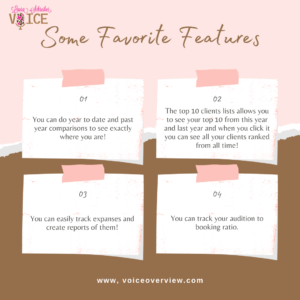 One of the features I was super excited to learn about was the ability to duplicate a job! I had no idea that if you have another booking with the same client you can do this! Wow, my mind was blown. We talked about favorite features including integration with WavesApp for invoicing, allowing for seamless invoicing and tracking of payments. Dani said that Fresh Books and Quick Books are coming soon! We talked about the year to date and past year comparisons. We also talked about the top ten client feature. Not only can you see you work with your top 10 clients during this year and in years past, but when you click on it you can get a ranked list of all of your clients from all time! We also talked about the reports feature. As a user, you can run reports on any data: contacts, jobs, expenses. You can then export and extract the data. Lastly, we spent some time talking about job reminders settings, and as I go through me notes I realize that I need to log in and reset my own! These job reminders can be set to off, 30 days, 60 days, or 90 days. The features are remarkable and were created by a voice actor for voice actors.
 Dani said she is far more motivated since she has this in place. She also has a goal of doing at least 100 auditions per month to continue to bring in new clients, and it helps her track that ratio. She also said that the invoicing feature has been huge for her. I can tell you that Voiceoverview has been a game changer for me too. I am not guessing and as my business trends shift, I understand why and where it is going. It helps me make informed choices about my marketing strategy as well.

