Q: What tweaks have you made to your set up that work well?
When I first built my professional home studio, I worked with my MacBook Air in the booth. For years I did this without issue. About two years in, I noticed that after very long recording sessions i had a lot of fan noise. I had gotten a great tip from Jack de Golia, a brilliant voice actor in Las Vegas, to always have ice packs handy, but after a while this became burdensome so I upgraded and put an iMac outside the booth and a monitor in the booth. This works MUCH butter. Here is a video made from a recent instagram story based on this very set-up question. If you can have this kind of set up, it’s great.
 I also recommend having practical hooks in your book. I have a hook for my cans and a hook for my wires. It helps keep things neat and organized.
Q: What is your favorite way to connect for live sessions?
I have a new favorite way to connect: Zenncastr!! I have used this quite a few times recently, especially for long, guided eLearning sessions and it is great. There are no latency issues and it is very easy to connect, even easier than Source Connect. If only one person who is connecting has it, you can send them a link so it eases the financial burden as well. There are multiple price points, all of which are affordable. I love that when we speak during the session, all participants are recorded on separate tracks. So, if you are a coach recording a demo, or a voice over actor recording for a client, you never have to edit out any back and forth as you might on zoom. Then, at the end, you simply upload the audio.
 I also do love having Source Connect. So many clients and agents require it. I occasionally need to have support sessions, and they do offer great support from Source Connect. Again, like with Zancastr, there are no latency issues. There are, though, sometimes quirks connecting. Sometimes people are confused with how to use it. If you are not both connecting with the same sample rate, for example, you won’t connect smoothly and it will be an issue, so that all needs to be decided ahead of time.
I also do still like to use zoom for the ease of use. Sometimes, even with the latency issues, it is great to just throw up a link and go! Especially this year, everyone knows how to use zoom, and it is nice to have a stress free connection for a live or guided session.
Q: If you could change anything about your studio, what would it be?
This might sound trivial, but it is not meant to. My booth is a rectangle and I have all this wasted space behind me. I could have saved a lot of money by making it a smaller square. The space behind me goes unused and is just a waste. I have to work with an acoustic board behind me, so I don’t even get to enjoy the roominess.
I have blogged about this before, but I would also choose a different color foam if I had the option. I hate that my white aurelex foam has turned yellow. I would either do panels or grew foam next time around.
Q: Can a voice over coach help with your studio set up?
A good voice over coach is still not an audio engineer. While I love to talk about gear with other voiceover actor and with students, it it is fun to talk about set up, I did not go to school for sound engineering. I do not have a degree in audio engineering. Everything I know about my studio, I know from having training with various audio engineers. As a voice over coach, I do work with students on microphone technique, but that is NOT the same thing is telling you how to set up your studio. Dave Scott, who do demo production with, can give you expert advise on how to set up your booth and guide you about what to invest in and how to actually set it up.
Q: What do you wish you knew when you first started your voice over studio?
 I wish I know how important a good travel rig is. It took me five years to get my travel rig to sound as good as my home set up. That is WAY too long. If you are just starting in voice over during the pandemic, I realize it is hard to imagine actually packing up and leaving home, but when we do, the rig matters.
I wish I know how important my website was. I spend so much time working on inbound marketing through my website now, but my business was going for several years before I figures that out.
 For the first time in my five years as a full time voice over actor I mis-quoted a client. In truth, I was extremely tense about the election results so if I did not make a mistake here I could have made one some where else. A new client found me on LinkedIn for a toy project. I have a tight NDA, but I can say that it’s a toy and right away my voice seemed like the perfect fit for this project.
 When the client had their final script, they emailed me an NDA and a contract. Then they emailed me the finalized script which was again an excel spreadsheet. In the email they confirmed the initial rate. To my horror, I realized immediately that I had under-quoted the client significantly. The script was not 4 lines, It was 154 lines. Further, they needed the files split which was also not included in the initial bid. My heart sank. I never want to disappoint a client or to make their job harder. I genuinely thought the job was the first four lines. I am not clear whether or not the client was also questioning if the bid covered the full scope of the project by the way their email was written, but I still had to re-quote. With all the work I had, I would be spending a good deal of time on this and could not do the job for the rate I had initially quoted. I felt, though, like a buffoon.
 Immediately I messaged my accountability group with whom I speak to all the time, every day. I trust these women more than anyone to lead me in the right direction. When they did not respond within minutes, I called them. Two of them were actually together at that moment, and they helped me draft a thoughtful and sincere email to address my error and revise the quote. It began with “I do apologize but…” I felt awful about doing it but I also could not live with myself if I did not. Interestingly, it was the opinion of two of the others in the group that the error was mine and I should do the job at the lower rate. They pointed out that I risked both losing the client and that if this client knows other clients I risked tarnishing my reputation. I weighed my options and sent the email with the revised quote.
 The client was not pleased when she got the email with the revised quote she had to go back to both her team and to the clients for approval. The next day I heard that they were ready to move forward. I ended up having to call the client. When I downloaded the excel spreadsheet, I had some formatting issues as a Mac user. I called the client and they were extremely helpful. It was actually great to speak with them and have yet another opportunity to apologize and let them know that I genuinely did not intend to make things difficult for them. Our chat went very well and I am extremely thankful to have laid what I hope is the foundation of a good working relationship.
 When everything is working perfectly in your booth, your bookings are solid, and you are happy with your sound, why shake things up with a gear upgrade? Well, life is not always so cut and dry in the voice over world. While I was really proud when I upgraded to the Avalon M5 preamp, and loved the way it sounds with my Neumann TLM 103 microphone, it is not portable. I’m at a point in my career where if I travel, which happens when there is not a pandemic, I need to sound the way I sound in my booth when in my travel rig. With an Avalon preamp and a Neumann mic, I sound pretty awesome. Even with a VOMO, it is hard to emulate that sound without bringing the Avalon, and if you have ever been in the presence of an Avalon then you know it is not portable. Thus, my journey began.
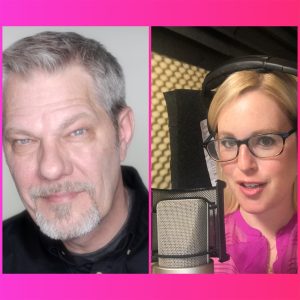 One of my VO besties, and all around favorite people on the planet, the amazing Kim Handysides, suggested that I work with the VO Tech Guru Tim Tippets. Kim said Tim does amazing stacks and would set up my travel rig. Initially I had not planned to change my in studio set up with the Avalon M5, just the rig. I reached out to Tim. Tim is amazing because he could just set you up and give you the answer, but instead he spends the time to educate you so that you understand the rationale behind his suggestions and why he is guiding you down a certain path.
 To Start, I was limited because I was working on a 2015 MacBook Air. Even though my MacBook Air is running really well (knock wood), it only has one Thunderbolt 2 connection and the rest are USB ports. This posed some logistical challenges in terms of suggestions Tim wanted to make. Further, at the time, I was set up to mirror in studio on a monitor. So my MacBook Air stays in an office space outside the studio and I have a great monitor in my booth.
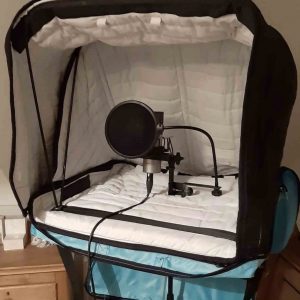 So this brings us back to the travel rig set up, which is also pretty exciting. After all, this entire journey started because of the travel rig, right? So, what is my travel rig set up now:

