The Casting
 My recent commercial booking for JP Morgan makes for a great case study in voice over bookings. As a professional voice actor, every booking makes us happy, but when the producer emailed me about these radio spots, his explanation was interesting. I was cast directly without auditioning. He did not mention my voice. Nor did he mention my demos. In this instance, it was a matter of scheduling and availability. As I work full-time, they needed someone who could accommodate a live session at a specific time, which turned out to be 11 a.m. on a Friday morning, and he needed to confirm that I was available. The timing, in this scenario, was the most important question I was asked. The producer got back to me and confirmed that I had indeed booked two spots and it was a go. I was delighted.
The Tech
I asked the producer if we would be using Source Connect or Zoom, the most common ways I connect for live sessions. Initially he gave me a phone patch dial-in and password. This would have been fine. Then, at dinnertime the night before the session, the producer said that the clients preferred Zoom and the team at Spotify sent a link. That was also fine. I recently worked with the VO Tech Guru, and he showed me how to do audio playback during zoom sessions, so I was really excited to test it out during my session.
The Pre-Session Prep
 I prepare for every single session, whether I am self-directing or in a live session. Part of my prep is administrative. I take some time to log the job in my CRM and create the invoice. I then print a large print version of the script using my preferred font. Then, prior to marking up the script, I spend a bit of time researching the brand and their other ads. Interestingly, JP Morgan and Chase are linked. As a client, when I log in for my JP morgan account I also log into my chase account. Well, at the moment, the below Chase spot is the most sought after read in a long time. Clients often request this as the benchmark for tone, style, and pacing, so I had this in mind going into my session for sure.
The Start of the Call
 I think the start of a live session is really important. There happened to be a lot of people on this call. In addition to the producer, there were several people from the Spotify team and several people from the JP Morgan Team, including the scrip writer. In my mind looking back here were at least eight people on the session. It is my job to make them happy and to make them comfortable. I try to use the time at the start of the session to let them know that my feelings are not a factor, and that the only thing that would upset me would be for them to know have exactly what they need at the end of the call. I try to have friendly banter, but I want them to know and to be comfortable that I will give them whatever they need, and that it is not about me, it is about them. I think there are a few precious moments to establish this rapport and set the tone.
Working Through the Spots
 With so many on the call, there can be a lot of side chats during a directed session to make sure everybody has the takes that they want. This team was fantastic. They gave very clear direction and it was easy to take their feedback and run with it. They also all remembered to mute themselves while I was recording, which makes everything seamless. In this session, I read the first script all the way through three times. They gave me feedback. I again did three takes, and then we did some variations of the lines. Then, after the line reads, we did the whole script again. It really came together nicely. It was also super exciting to use Zoom’s audio share feature to play back the audio for the clients during the session so that they could mark the takes that they liked and we could also check the timing of the spots. Then we moved on to the next script, and worked through it the same way. The second one went a little faster as I understood what they were looking for from the first spot. All in all, the group was great to work with. For me, because JP Morgan is my bank and I use the app, it was easy to see the product and be enthusiastic about it because I actually enjoy the very features I was describing.
The Aftermath
After the session, I simply sent the drop box link to the producer. I had been deleting outtakes and pausing while we chatted during the session. As I’ve been doing this for years, I am now accustomed to marking the spots and deleting what is not needed during the session. It makes it so much easier to do it in the moment! It is a moment of great joy when I attach he link knowing that the producer now has what they want!
Final Thoughts
 I am often asked whether I prefer live sessions or self directing. The answer is really that it depends. I love self directing because it gives me a chance to be creative and a freedom to interpret the texts in front of me. I can explore my imagination and see where it goes. The downside, of course, is that there is always a chance of missing the mark and not giving the client what they need. With live sessions, I love the creative collaboration. I love working with other people. When I have the opportunity to work with the people who created the product or the people who wrote the script, I get a higher level of understanding and can often bring more nuance to the read. So, the answer is still: I depends.
 So on Wednesday a client emailed asking if I had availability for a live session for 4 spots, to 30 second spots and 2 60 second spots. Time was not the issue, I was happy to make time. Before even scheduling the session, which we planned to do via zoom, I had two hiccups. First, I had learned the day before that my son has to have emergency surgery tomorrow (not the day after the session, the day after I am writing the blog.) Jack has a rare problem called an intussusception which basically means his intestines are looped and it is quite dangerous, so that was weighing on me. Next, we were hit very hard by Tropical Storm Issias and still running on generator power. When I turned by iMac on in the booth it flickered constantly and I had a legitimate concern it would cut out during the session. I did not mention Jack to my client but I did tell her about our power issues. She told me she was having internet issues, but we decided to give it ago as she had a time crunch.
 At the start of the session the client could not connect via zoom. It just would not go through. We decided to connect via mobile phone. On a normal day, my mobile phone is not great in my booth because of all the insulation, so on this day it kept cutting out. I have had sessions where for no apparent reason we are cut off. On Wednesday we were cut off FOUR times. Yes, that’s right, FOUR TIMES. I kept clicking save, in fear that I would also lose my computer, which thankfully didn’t happen.
 I was terribly emotionally distracted. I should have meditated and prepared before going into the session. As a working mom, I always want to work because I have financial goals that I need to meet to help provide for my family. The thing is, I don’t have a shut off switch. I did not leave my feelings outside my booth. I have always felt that bringing all of them with me into the booth has helped with my reads, but in this case I needed to cope better. I needed to be honest about my ability to function and I needed to prepare differently. I also needed to realize sooner how frazzled I was and get it under control. I was having a real time melt down and just needed to stop and re-set.
 When the client emailed me with the booking, in truth it did not even cross my mind not to take the gig. I always think of how I can best meet a client’s needs. In retrospect, I am positive that I would have deeply regretted not trying. I would have seen it as a missed opportunity. That would have been so upsetting too. My hope is that they see me as someone willing to work hard even with this going on and that they do not write me off. I am well aware that this is a competitive industry, so it is possible I won’t hear from them again, but I sure hope not. The other take away is that I have not been spending a lot of time practicing my craft and working on my read rate. This was a great reminder that those skills always need work. My hope as I reflect on this session is that I am defined from my ability to work through this and not by the worse session I have ever had.
 There are a lot of things that will make 2020 memorable for the rest of our lives: living through a pandemic, the national election, the state of our country in general. As a long-time professional voice over actor, one of the trends I have noticed in the past few months as bookings have picked up again is that so many of them involve live sessions also referred to as guided sessions. Prior to Covid-19, I would say that I self directed 80% of my work, and the rest were live sessions. Now I have live sessions almost daily. Interestingly most of my clients prefer zoom, although often I am asked if I have Source Connect and specifically which version I have. I do happen to have the highly sought after standard version, but interestingly that is not what is most often requested by my average client when they want or need a guided sessions. How do I feel about this rise in live sessions? I love them!
 The major trend I have noticed is how many participants are in on the call. It used to just be one or two except when I was doing video games or mobile apps, then I typically had more. Recently, on almost all of my sessions except for a tv spot last week that was just one producer, there are huge teams of 7 or 8. They seem to like to bring on everyone from the person who cast me to the person who wrote the script to the folks from the brand to the creatives putting the content together. The teams are big. And what seems to happen now is that one person will give directions. Then they will tweak the directions. Then when they are satisfied they will ask for feedback from everyone else on the team. This can go on an on and it can be very amazing, depending on how patient you are. As I have been fortunate to have a lot of well-written scripts, it is typically easy to provide alternative reads, but that is not always the case. Most of the time the teams are on the same page and most of the people keep themselves on mute. I have been on a few calls where someone forgets to mute themselves and we have some issues later.
 As I mentioned earlier, a lot of my clients ultimately ask for zoom even though I have Source Connect. I actually think this is related to the trend of included everyone in the live session. It is much easier to loop everyone in via zoom, when with Source Connect only the ones with the subscription can join.
 One quick note, as the voiceover industry is typically quite an international one, do mind your time zone conversions! It can be trickier than it seems! Years ago I had a session with a client in the South of France. I was coming back from the beach myself, and little did I realize I asked them to record at 10 PM their time. I felt terrible. More recently I had a new client in Mountain Time! I was so confused by this. I don’t know why, but it twisted my head in a pretzel. So, especially if you have multiple bookings in one day, try not to overlap them! The zoom calendar is super helpful that way!
 I will start by saying that the past five years have flown by and while I have had to seek help with my studio gear, my MacBook Air has been dependable in every way since its purchase. I have not had issues with my computer. I have been extremely happy since switching from a PC to a Mac, and have been extremely happy with the MacBook Air specifically. So, why switch? Well, as per my blog last week, I made a lot of gear upgrades in my studio recently. The early 2015 MacBook Air I have only has one Thunderbolt B port and NO, as an not a single one, Thunderbolt C ports, and it was not possible to have both my pre-amp and my studio monitor hooked up simultaneously, while both are essential. So, I made the choice to upgrade.
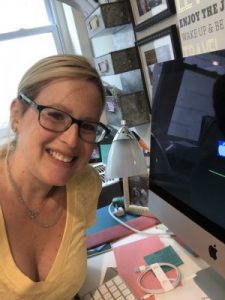 The set up went well. It took me most of the day. It arrived around 10:30 am and by dinner I was up and running, and the timing was pretty good. Coming the Friday of a holiday weekend is ideal as the bookings I have for live sessions will not be until next week anyway. I had heard some horror stories of industry friends recently setting up new computers, so I was not optimistic or overly enthusiastic and I expected it to take a while. The initial backup from iCloud went ok. Then I had to install my UAD software. Since I had just done this with Tim last week on the laptop, I still remembered how and it was not fast but I was able to do it. I was worried about getting my settings onto the iMac, but I was actually able to use airdrop to move them from one computer to the other. Twisted Wave setup was a little tricker for me. I spent a while putting in my many keyboard shortcuts. I could not figure out why my effects stack would not open in its entirety. I realized I had to find my initial izotope purchase, download that, enter the ilok, and then open the effects stack. I was getting a little nervous that I would need a session with Tim, but to my own surprise I was able to get it going! I am happy to report that the monitor in my booth connected with ease and I am so thankful to have my booth in working order. I am still making tweaks like syncing my drop box and connecting my pay to plays in my chrome short cuts, but for the most part it is set up how I want it!
 Rome was not built in a day, and I am sure that in the coming days and weeks I will realize other applications that need to be installed on the iMac. I am thankful, though, that I accomplished as mush as I did at the start. My plan is that the desktop will live in my office space and my MacBook Air will now reside upstairs and will also be dedicated to my travel rig. It has only been since Friday, 48 hours, but so far this seems like a really wonderful upgrade. Ultimately, this isn’t about just changing computers, right. I had a setup that was working until it wasn’t. I made a change. I used to really fear change, but I know know (more than understand, actually know) that change makes me better and presents opportunity.
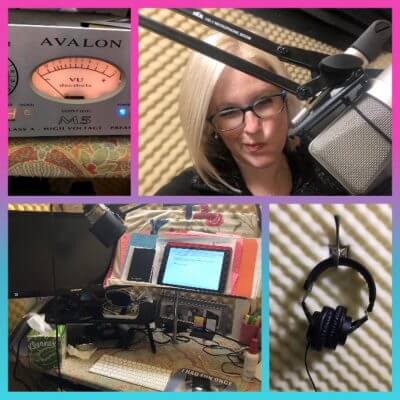 As always, I record everything in my broadcast ready home study on my Neumann TLM 103, Avalon M5 preamp, Steinberg UR12 Interface, and Macbook Air with Twisted Wav. I offer live sessions with flexible hours as I am always in the studio full time via Source Connect, Zoom, and Skype. I am always happy to self direct too, but for jobs over $250, I always offer the option of a live session, so that you have what you want when you want it. Audio recorded in live sessions is final delivery, as is industry standard. I never end a live session into my clients are thrilled with the audio.
 IpDTL was the first method I ever used to connect. My very first coach, Anne Ganguzza, used ipDTL for all of her sessions. So, I was very comfortable with this when I launched my business and proud to offer this to my clients. Around the time that I opened shop, I had two agents who said they would sign me if I had an ISDN line. I learned that it was no longer possible to get regular ISDN lines in my part of New Jersey. So, I use an ipDTL bridge to ISDN. I have my own direct number. Initially I was thrilled. I always test connect before a session. I have had more than one snafu. To his credit, the creator of ipDTL is very available via facebook and tries to address all issues. There is, however, a considerable time lag as he is across the pond and he never figured our why my hiccups happened. I have been fine with my regular ipDTL service but I am less than confident in my ISDN service. I will say that when I send my clients an ipDTL link and they have never used it before, they are always very impressed with how clear the connection is.
 I have some clients who love to use Skype and Zoom. I link them together, I suppose, because anyone could use them for anything, even outside of VO. If you are using them for voice over, be mindful to check your settings and be sure that you are coming through your pre-amp. Both of these are easy to use and for zoom if your session is under 45 minutes they are free. Skype is free as well. I find that my clients in Europe and Asia LOVE Skype and love to message on Skype! So, if you work with folks on Skype, remember to check your messages from time to time.

